๐Ÿ˜‚

OK, THE EXPERIMENT FAILED

Turns out .lol doesn't magically make money.

Back to SEO.

Welcome back to JobBoardSearch.com
...where we do things the hard way. ๐Ÿ˜ญ
For niche job boards ยท Google Search Console + AI

Turn your Google rankings into applicants

Your job board already shows up in Google for thousands of searches. Search Console AI connects to your Search Console, finds the searches you are close to winning, the job pages you are missing and the expired pages wasting your traffic, and tells you exactly what to fix.

Already listed? Open your board's owner area and choose the Search Console AI tab.
12 monthsof Search Console data in one sync
AI analysesgaps, quick wins, CTR, cannibalization
Google for Jobstraffic report and drop alerts
Read-onlydisconnect any time
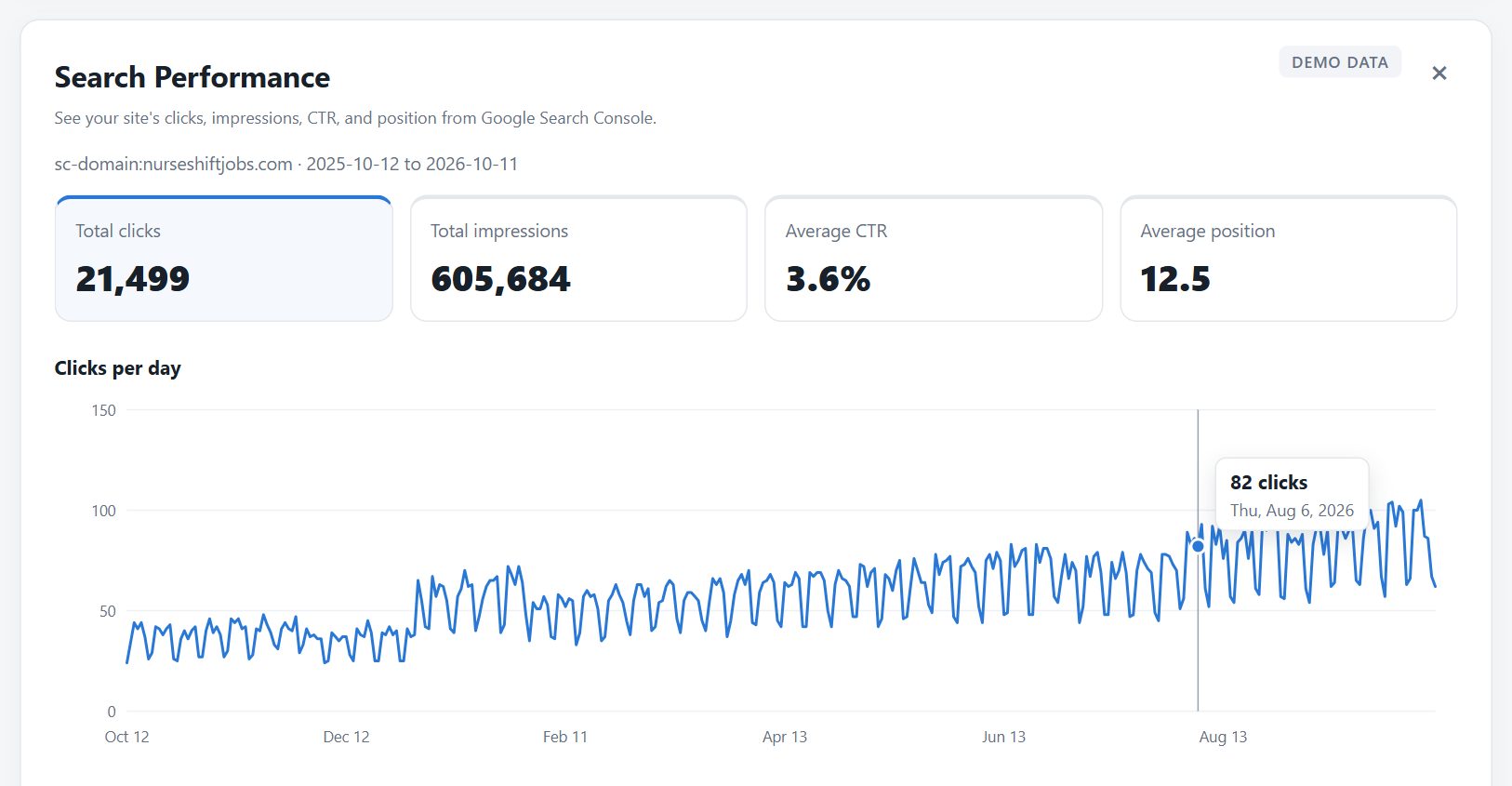
Search Performance report for a nursing job board: clicks, impressions, CTR, position and a daily clicks chart

See it on a real niche board

A 90-second walkthrough on a nursing job board: the search report, striking distance, Google for Jobs, the expired jobs check, AI content gaps and monitoring.

Demo data: NurseShiftJobs is a fictional board used to show the tool.

What it finds on your job board

Five reports built around how job boards actually get traffic: job searches, job pages that expire, and Google's own job search box.

Striking distance

Searches where you are already on page 1โ€“2

See the queries your board ranks for at positions 5 to 20, sorted by impressions, with the exact page to improve. These are the fastest wins: no new content, just a better page.

  • Query, ranking page, impressions, clicks and position
  • Sortable, with your whole query and page history one click away
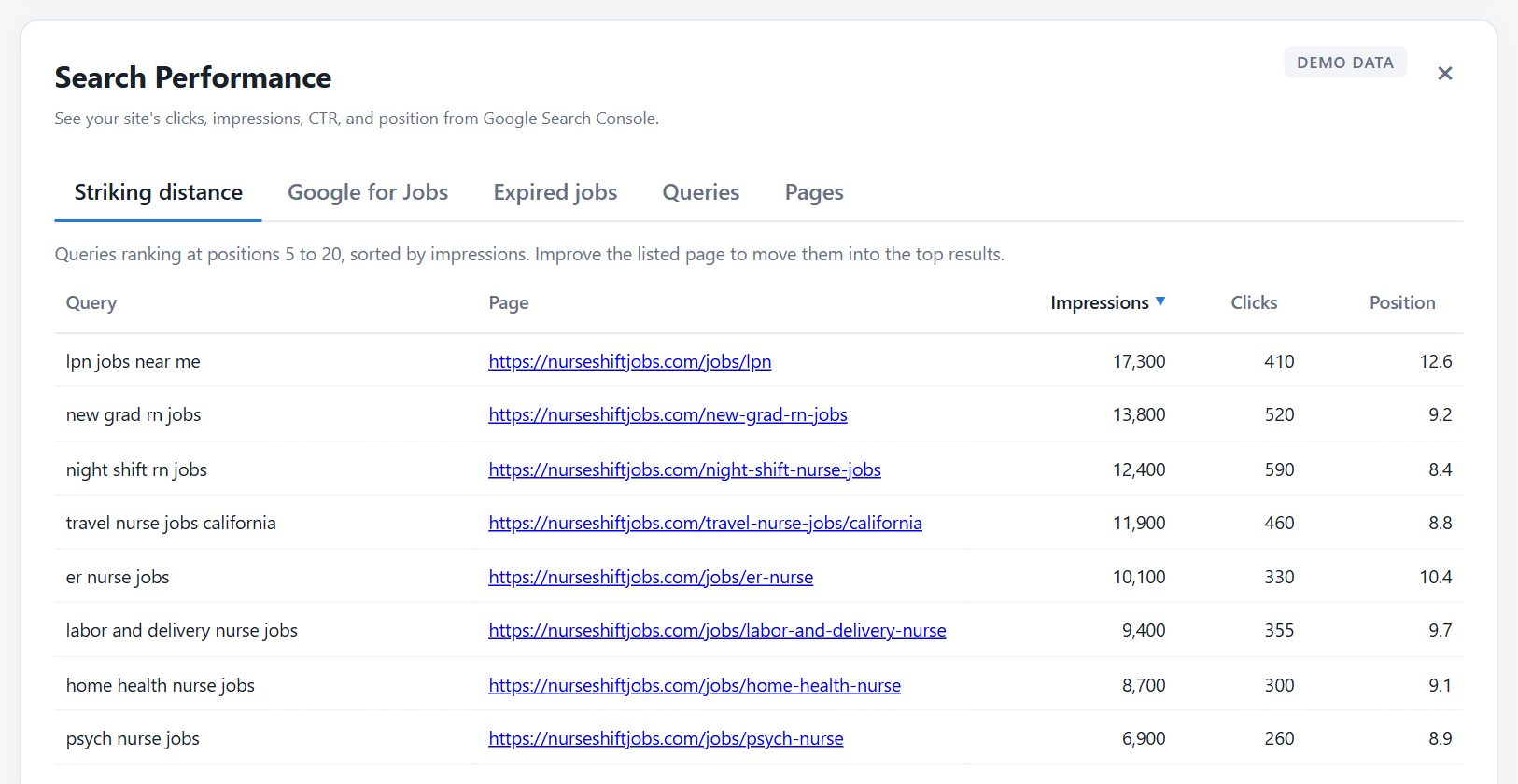
Striking distance report listing nursing job searches at positions 5 to 20 with the page that ranks for each
AI content gaps

Job pages people search for that you don't have yet

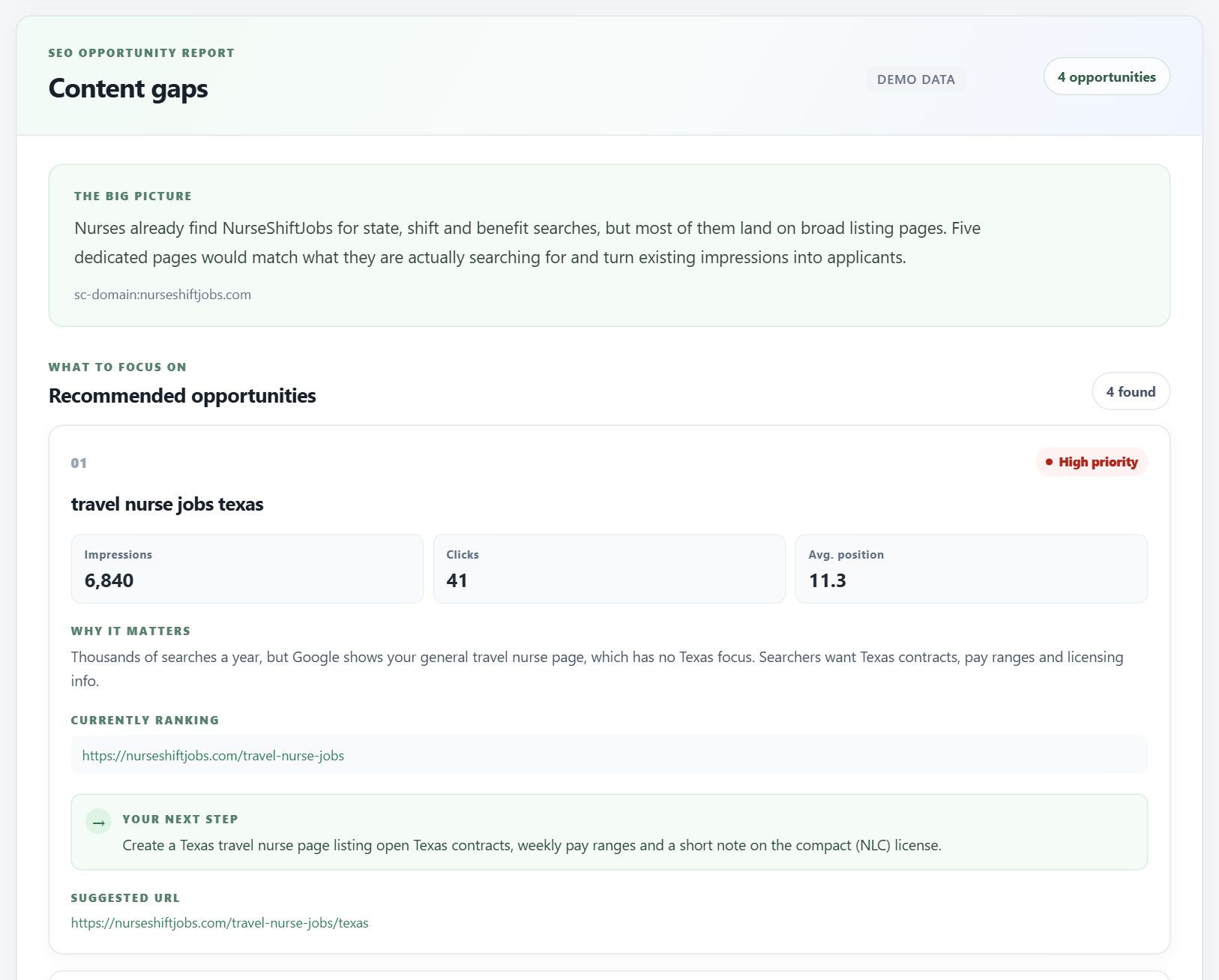
AI reads your real search data and spots the role, location, shift and benefit searches that land on generic pages. Every finding explains why it matters, what to build next and a suggested URL.

  • Content gaps, quick wins, low-CTR fixes, cannibalization and query/page mismatch
  • Checks your sitemap so it never suggests a page you already have
AI content gaps report recommending a Texas travel nurse page for a nursing job board
Google for Jobs

See how many applicants Google for Jobs sends you

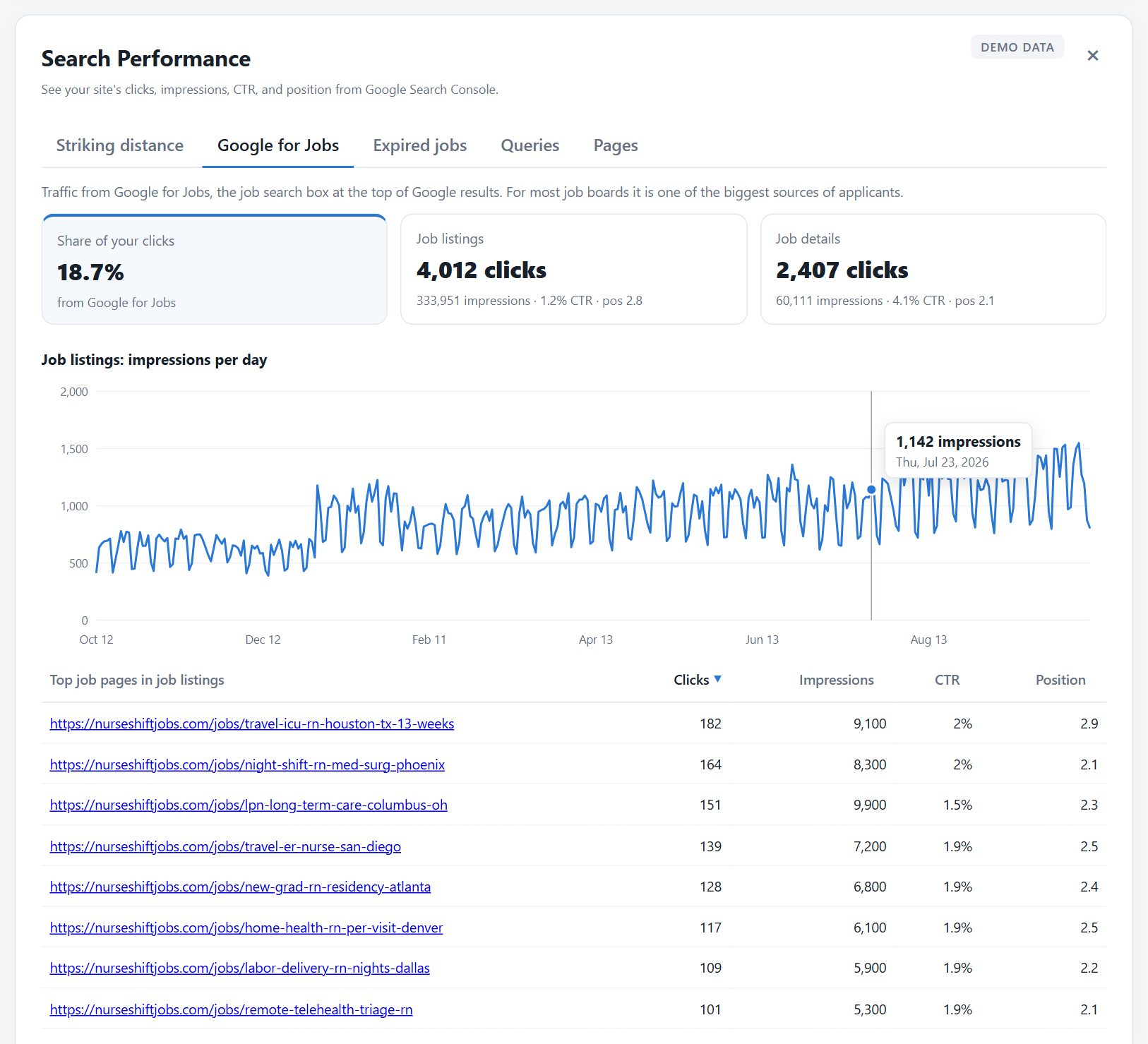
Google's job search box is one of the biggest traffic sources for job boards, and most tools ignore it. See your share of clicks, daily trend and top job pages, and get warned when that traffic suddenly drops.

  • Job listings and job details tracked separately
  • Drop alerts (Pro) usually mean broken JobPosting data: catch it in days, not weeks
Google for Jobs report with share of clicks, job listings and job details totals and a daily impressions chart
Expired jobs check

Stop sending job seekers to dead pages

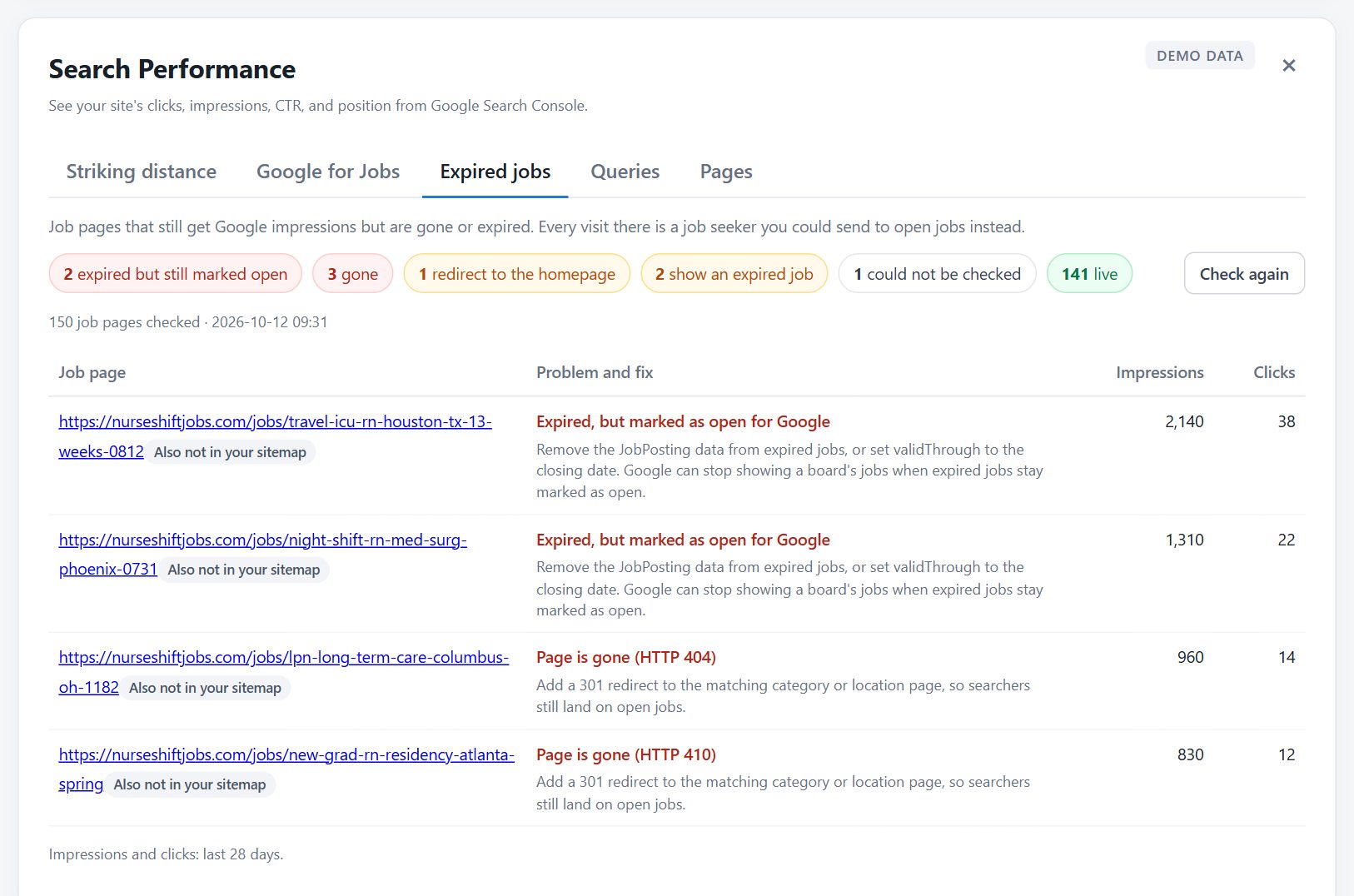
Old job pages keep ranking after the job is gone. One click checks your busiest job pages and finds the ones that return errors, redirect to your homepage, or show an expired job that is still marked as open for Google.

  • Each problem comes with the fix: redirect, show similar jobs or update the job data
  • Uses no credits and only visits pages on your own site
Expired jobs check showing job pages that are gone, redirect to the homepage or are expired but still marked as open
Monitoring ยท Pro

Know what changed without opening a dashboard

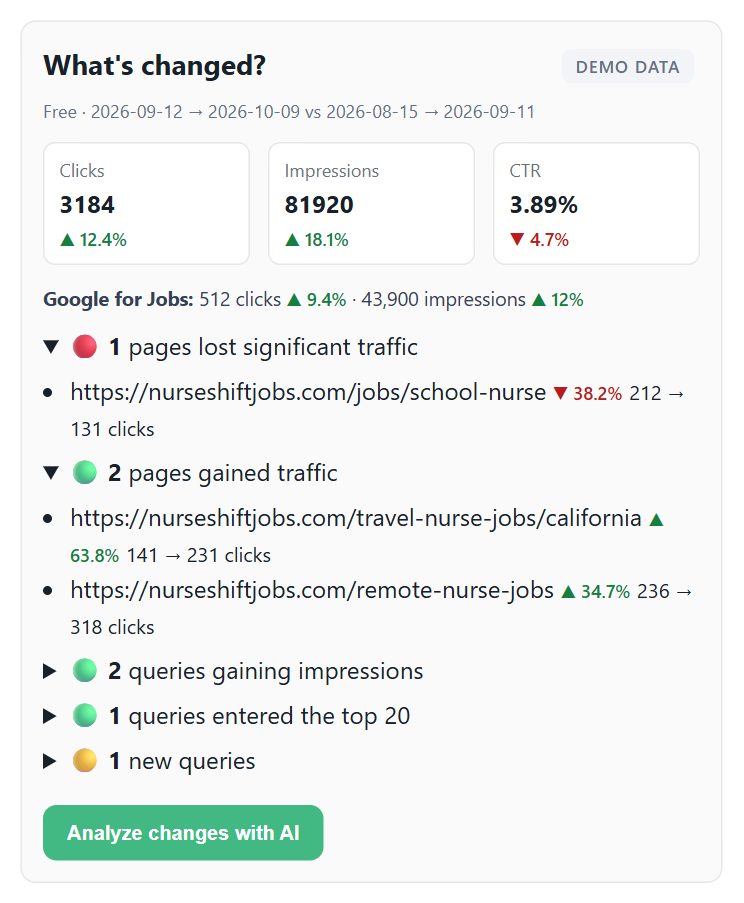
Pro syncs your data every few days, compares the last 28 days with the 28 before, and emails you the pages and searches that gained or lost traffic, with an AI summary of what to do about it.

  • Pages that lost or gained traffic, rising and new searches
  • Automatic reports don't use your credits
What's changed card comparing the last 28 days with the 28 days before for a nursing job board

How it works

From connecting Google to your first fixes takes a few minutes.

1

Connect Google Search Console

Sign in with Google from your board's owner area. Access is read-only, and only your job board's own website can be connected.

2

Sync 12 months in one click

Searches, pages, rankings and Google for Jobs data are pulled in automatically. Syncing and browsing your data is always free.

3

Open the reports, run an AI analysis

Start with Striking distance and Content gaps, then fix the top suggestions. Each AI analysis costs 1โ€“3 credits.

4

Let monitoring watch it for you (Pro)

Automatic syncs and email reports tell you what changed and what to do next, including Google for Jobs drop alerts.

Built for job boards, not generic websites

General SEO tools treat your board like a blog. Search Console AI looks at the things that decide whether job seekers find you.

Speaks job board

Suggestions are about roles, locations, shifts, salaries and job pages, not generic blog SEO advice.

Google for Jobs built in

Your job search box traffic gets its own report and drop alerts, because for job boards it is a main traffic source.

Made for expiring content

Job pages expire every day. The expired jobs check is built for a problem generic SEO tools don't even look at.

Simple pricing, with early bird prices

Start free. Syncing and browsing your data is always free; credits are only used when AI analyzes it. Subscribe during early bird and keep the lower price.

Free
$0 forever
4 AI credits / month
  • 3 analysis types
  • Free data sync
Starter
$19 / month
$29Save 34%
30 AI credits / month
  • 5 analysis types
  • Free data sync
  • Striking distance report
  • Google for Jobs report
  • Expired jobs check

Pick a plan inside the tool after connecting Search Console. Cancel or switch plans at any time.

Frequently asked questions

Is it safe to connect my Google account?

Yes. Access is read-only: the tool can read your Search Console reports but cannot change settings, submit URLs or touch your site. Your Google access is stored encrypted, and you can disconnect at any time, which also revokes the access at Google.

Who can use Search Console AI?

Owners of job boards listed on JobBoardSearch. Add your board for free, open its owner area and choose the Search Console AI tab. Only your job board's own website can be connected, as a URL-prefix or domain property.

How do credits work?

Syncing your data and browsing the reports is free. Credits are only used when AI analyzes your data: 1 to 3 credits per analysis, and running the same analysis again on the same data costs nothing. Credits reset every month. Pro monitoring reports and the expired jobs check use no credits.

Does it show my Google for Jobs traffic?

Yes. The Google for Jobs report shows how many clicks come from Google's job search box, the daily trend and your top job pages there. On Pro, monitoring warns you when that traffic suddenly drops, which usually means Google stopped reading the JobPosting data on your pages.

What does the expired jobs check do?

It visits up to 150 of your job pages that Google showed in the last 28 days and tells you which ones are gone, redirect to your homepage, show an expired job, or are expired but still marked as open for Google, each with how to fix it. It only visits pages on your own site.

What data is sent to the AI?

Only the search data needed for the analysis you run: search queries, page URLs and their clicks, impressions, CTR and position. No personal data about your visitors, candidates or employers is sent, because Search Console does not contain any.

Can I cancel at any time?

Yes. Cancel or switch plans from the plans section in the tool. If you cancel, you keep your plan until the end of the period you paid for, then move to the Free plan.

Your next applicants are already searching for you

Connect Search Console, sync your data for free and see which searches, job pages and Google for Jobs listings are one fix away from more applicants.